It’s the seemingly simple things that seem to eat into meaningful productivity, and for me, I’ve struggled on multiple times with Fluentd’s parsers related to non-standard time formats. This post is an attempt to share what I’ve worked through in an attempt to help any others who might be faced with the same issues that I seem to encounter. In this situation, I’m attempting to forward logs from Suricata‘s fast.log to an Opensearch instance. The logs look like the below, and can be successfully parsed with the following regex.

^(?<timestamp>\d{2}\/\d{2}\/\d{4}-\d{2}:\d{2}:\d{2}\.\d{6})[\s]*\[(?<second_field>.*)\][\s]*\[(?<rule_id>\d*:\d*:\d*)]\s*(?<rule_name>.*)\[.*\](?<fifth_field>.*)\s*\[Classification:\s(?<class>.*)\]\s*\[Priority:\s(?<priority>\d*)\]\s{(?<protocol>.*)}\s(?<source_ip>[\d]*\.[\d]*\.[\d]*\.[\d]*):(?<source_port>[\d]*)\s->\s(?<dest_ip>[\d]*\.[\d]*\.[\d]*\.[\d]*):(?<dest_port>[\d]*)In this use case I need the events to be ingested and formatted in a usable manner, with specific types such as IP address, integer, and time being correctly associated with each field.
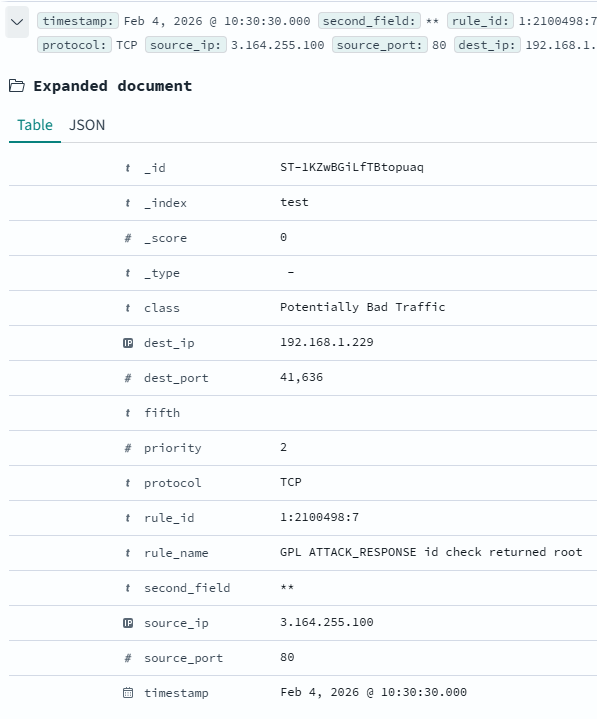
If left to it’s own devices however, the Fluentd Agent will not forward the timestamp field, not will it assign any types other than Text. This prohibits functionality that requires integer parsing, or IP address mapping. To resolve this issue, I have manually created my Index inside of Opensearch, specifying all of the fields along with their desired types. This can be done via the UI under Index Management > Indexes > Create Index, or via API call. A snippet of that JSON is shown below.
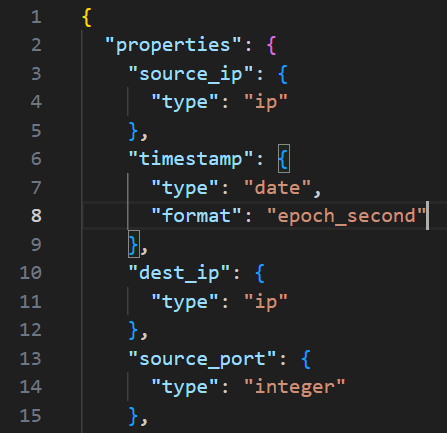
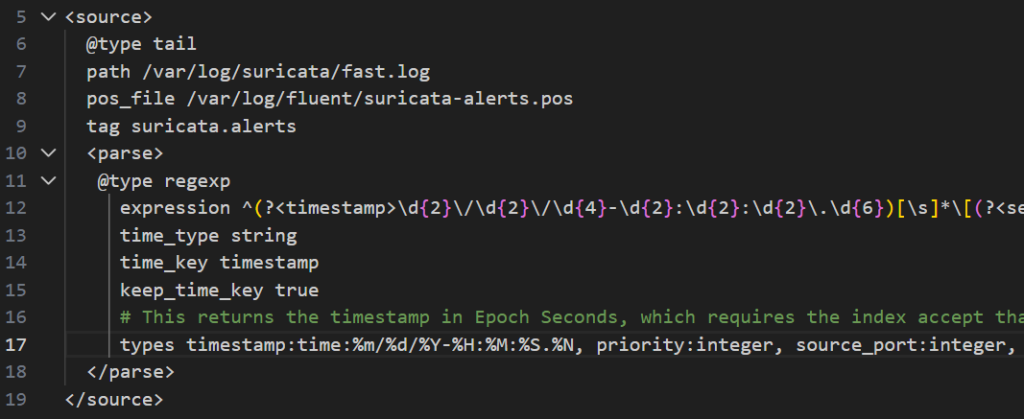
During this effort I ran into a secondary issue where the timestamp would refuse to parse or ingest into OpenSearch. A useful resource for troubleshooting, as well as defining your field types are the Supported Field Types – Date, which outlines what formats can be defined to be accepted by the OpenSearch server. If your timestamp is coming in as epoch milliseconds, but your server is expecting epoch seconds, this is how you correct that behavior as you see in the above screenshot.
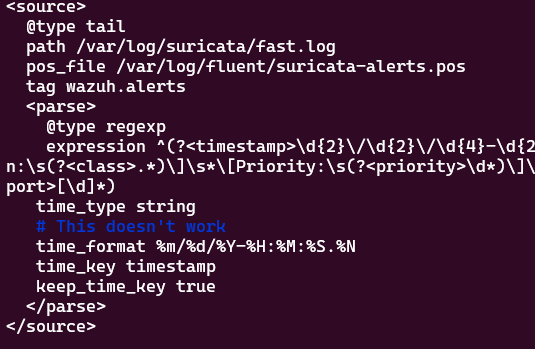
However, even after looking at length at the Fluentd Parser’s time documentation I was still unable to ingest timestamps on events correctly. As you can see below, I have the time_format specified…
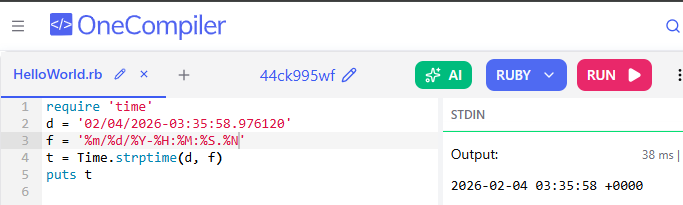
…and if you use the underlying Ruby strptime function in a test environment it works correctly against the timestamp and the date format.
Yet, a variety of issues arise, from errors like the below (with the above config), all resulting in either an incorrect time being associated, or no time at all. I have even attempted to build out a custom date regex on the OpenSearch Index matching what I understand the Fluentd agent to be sending. All to no avail…

At the end of this endeavor I discovered that a combination of things allowed for the proper ingestion of timestamps by a conversion of the timestamp value to epoch seconds.
- Manual creation of the index, specifying the epoch_seconds as the date format.
- Using the Types Parameter in Fluentd to convert my timestamp field to a time (in Fluentd’s eyes), using the specified date format. You can see this below in Line 17. Simply specifying the same date format using the time_format key does not work.
This experiment has taken far longer than anticipated, but I was able to learn more about Opensearch and Fluentd along the way. I hope that this helps accelerate someone else on their journey, and if not, I’ll probably end up reading my own notes here in the future when I run into similar problems again.